Since the release of Terminaux v8.0 on October 13th, 2025, more than six months came and went with continuous bug fix and feature releases, which brought improvements to all the console applications that are written in C#. This version was a long-term support release that added many interesting features while improving the performance of all console applications in all platforms, including Windows, macOS, and Linux.
In an effort to keep providing a minimal set of feature additions while adding bug fixes and general improvements, we are very thrilled to release the third point release for Terminaux v8.x series today!
During development of Terminaux v8.3, a new version of SpecProbe was under development, which added support for those who are running FreeBSD on their systems. This aligns with our plan to provide official support for FreeBSD systems, and this support came to fruition with the release of both SpecProbe v3.8.1, while required improvements for FreeBSD support were integrated with the release of version v3.9.0.
New features
This version of Terminaux adds new features that will make your interactive textual user interface applications written in C# more powerful, including, but not limited to:
- Added accurate progress bar design: The accurate progress bar design in the console allows you to more accurately describe the progress of some operation, such as large file copying and downloading. This uses eight Unicode block characters for both the horizontal and the vertical progress bar orientations.
- Added pane-specific keybindings: Keybindings that are only available in one pane in double-pane interactive TUI selector can be added, which makes your applications that use this feature more powerful, especially in use cases where a keybinding makes sense in just one pane.
- Added link markup: In addition to the two above features, the markup feature in Terminaux has seen an interesting addition. Now, with the inspiration from Spectre.Console’s markup syntax that supported both the plain link (
[link]https://google.com[/]) and the link with a display string ([link=https://google.com]Google[/]), you can now let your console application show you hyperlinks that can open in your browser withCTRL + Left Click.
Below shows you more details about the new features that we have highlighted as the biggest part of this version of Terminaux.
Accurate progress bar design

To be more specific, the accurate progress bar design can be achieved by setting the Accurate property in the ProgressBar, the ProgressBarNoText, or the SimpleProgress class instances to true, just like demonstrated in the below example code:
var progressBar1 = new ProgressBar(
    "This is the test progress bar that contains a scrolling marquee.", 0, 100)
{
    Width = ConsoleWrapper.WindowWidth - 8,
    Accurate = true,
    ProgressActiveForegroundColor = ConsoleColors.Red,
    ProgressForegroundColor = TransformationTools.GetDarkBackground(ConsoleColors.Red),
};
You’ll lose the ability to use your custom progress bar characters, because the accurate progress bar design relies on eight Unicode block characters in both orientations (horizontal and vertical), which don’t support custom characters that you can specify with the relevant properties.
Pane-specific keybindings
| First pane keybinding | Second pane keybinding |
|---|---|
 |  |
The keybindings that are available in the first pane only work when you’re already in the first pane in the interactive TUI selector. Similarly, the keybindings that are defined only for the second pane don’t work in the first pane. However, you can have the same key do different functions, depending on the current pane, without having to rely on extra code in the delegate function for the keybinding.
You can use this new feature added in this version of Terminaux by adding such keybinding to either the BindingsFirstPane property (available only when the current pane is the first pane) or the BindingsSecondPane property (available only when the current pane is the second pane):
tui.BindingsFirstPane.Add(new InteractiveTuiBinding<string>("Information", ConsoleKey.F4, (str, _, _, _) => InfoBoxModalColor.WriteInfoBoxModal(str ?? ""), true));
tui.BindingsSecondPane.Add(new InteractiveTuiBinding<string>("Length", ConsoleKey.F4, (_, _, str, _) => InfoBoxModalColor.WriteInfoBoxModal($"len={(str ?? "").Length}"), true));
Link markups
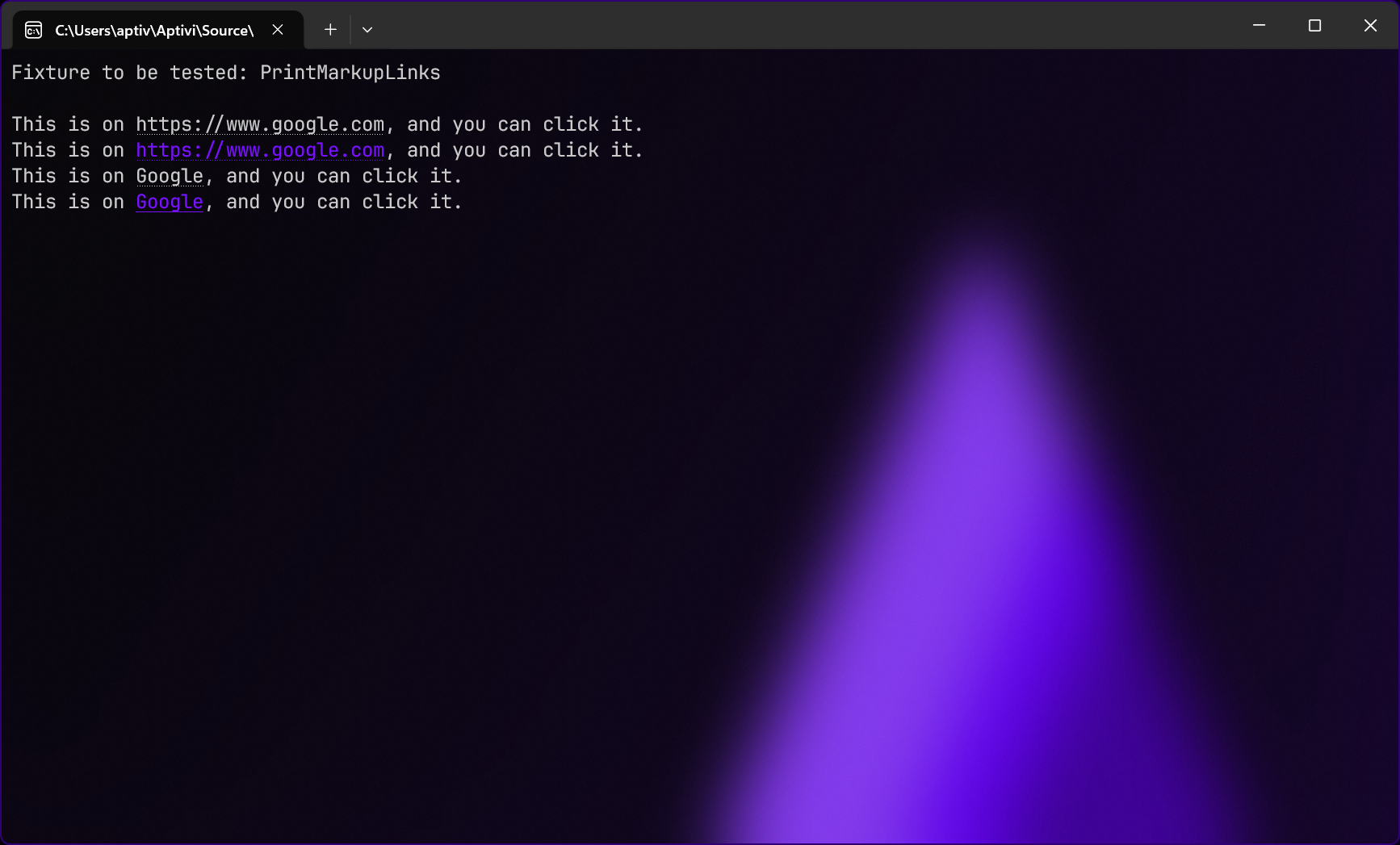
Console applications can now more easily form a link using link markups, inspired by Spectre.Console’s markup syntax for links, which is easy. You can easily construct clickable text in your console application with display name support using one of the following methods:
- Link only: You can make a console application display just a link using this markup syntax. This allows terminal emulators that don’t automatically parse links, such as those starting with
https://for web sites, to provide clickable links.[link]https://google.com[/]
- Link with display: You can also make a clickable link with display name for clarification for terminal emulators that support such feature.
[link=https://google.com]Google[/]
Users who use terminal emulators that support the OSC ] 8 ; ; operating system command sequence can benefit from this feature, since such terminal emulators show you a clickable link that you can open with CTRL + Left Click. You can even color and format links by appending formatting before the link marker.
TextWriterColor.Write(MarkupTools.ParseMarkup("This is on [link]https://www.google.com[/], and you can click it."));
TextWriterColor.Write(MarkupTools.ParseMarkup("This is on [#7711ff link]https://www.google.com[/], and you can click it."));
TextWriterColor.Write(MarkupTools.ParseMarkup("This is on [link=https://www.google.com]Google[/], and you can click it."));
TextWriterColor.Write(MarkupTools.ParseMarkup("This is on [#7711ff link=https://www.google.com]Google[/], and you can click it."));
Improvements
In addition to new features, we have also integrated some of the most important improvements, including the build system update and the security update for ImageMagick, which fixes 18 vulnerabilities in the native library, and we have documented it here.
Nested markups parsing has been improved to fix formatting-related issues in some cases where more than one markup tag is required. This fixes a very important bug, and the bug fix will be backported to v7.0.x and v6.1.x in a future update that will be released on May.
Upgrading Terminaux
To upgrade Terminaux to v8.3, follow the instructions by reading the manual.